 Label Compliance Review
Before you print
Check your food label before it goes to print
Upload the final artwork. RegaaS reviews it against US or EU food labeling rules and lists what to change while a fix is still a file edit, not a reprint.
Each review checks one market.
When to run a review
- 1When the artwork is final, before you sign off the proof
- 2After any change to the recipe, a claim or a supplier
- 3Before printing the same product for a new market
What the review checks on your artwork
- Product name and net quantity on the front panel
- Ingredient list order and allergen declarations
- Nutrition Facts or the EU nutrition declaration
- Name and address of the business
- Claims and the conditions attached to them
- Placeholder numbers or sample text left in the artwork
Where a requirement depends on what a picture cannot show — type height, boldface, contrast — or on information that is not on the label, the report says what to verify on the print file.
Find the risks hiding in plain sight.
A familiar label can still contain conflicting claims, overlooked conditions and missing evidence. RegaaS cross-checks label information and brings the findings together. See what AI found on a sample label below.
Book a Demo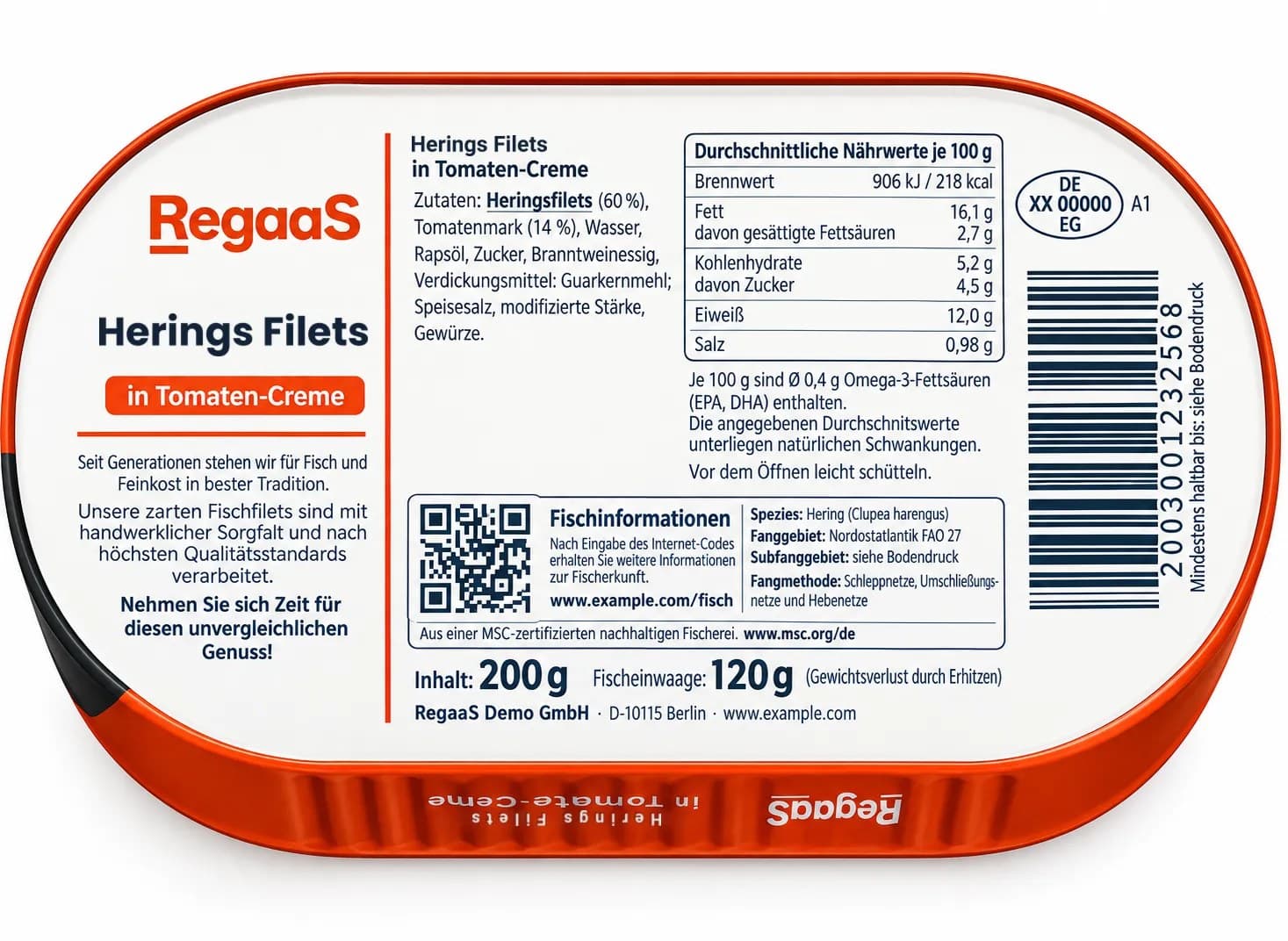
Findings on this side of the label
+1 more findings in the full report
What was found
The finding, and where it sits on the label.
Potential RiskModified starch failed to indicate botanical origin, resulting in insufficient allergen disclosure
The highlighted box on the back of the label marks the text this finding is about.
Why it matters
The report’s explanation, and the label text it found.
The ingredient list indicates “modifizierte Stärke” but does not specify its botanical origin; if the source is gluten-containing cereals (such as wheat), it cannot be confirmed whether the allergen information is fully disclosed.
Evidence found: Zutaten: ... modifizierte Stärke, Gewürze.
What to do next
The report’s recommendation, and its source.
Recommended adjustments:
Check the raw material source of the modified starch; if it contains gluten-containing cereals, it should be specifically labeled in the ingredient list (e.g., “modifizierte Weizenstärke”) to comply with allergen labeling requirements.
Source: REGULATION (EC) No 596/2009 p. 46
300,000 rules in the library11 issues7 Risks4 Suggestions
Counted as in the full report: issues are the Risks and Suggestions together, and related rules are grouped into one finding in the list. Note: This demonstration illustrates system functionality only. Product information has been modified and does not refer to any specific brand or product.
Send the label. Let AI handle the review.
1
Tell us what needs reviewing
Upload your label and choose the product category and target market.
2
AI does the regulatory work
RegaaS selects applicable requirements, checks label information and flags potential issues or missing evidence.
3
Get actionable findings
Receive a report with suggested corrections and regulatory references.
Questions about checking a food label before print
- What should I check on a food label before printing?
- The mandatory particulars for the market you sell in. For US food: the statement of identity and net quantity on the principal display panel, the ingredient list, allergen declarations, Nutrition Facts and the name and place of business. For EU food: the particulars listed in Article 9 of Regulation (EU) No 1169/2011. Claims and the conditions attached to them need checking too. RegaaS reviews your artwork against these rules for the market you choose.
- Can RegaaS review my print artwork?
- Yes, as images: upload PNG exports of the artwork, such as the front and back panels, up to 6 files and 50 MB per review. Export at a resolution where the smallest text is readable.
- Can a picture show type size, boldface and contrast?
- Not reliably. Where a requirement depends on print measurements such as type height, boldface or contrast, the report tells you what to verify on the print file.
- Should I run the review again after fixing the artwork?
- Yes. Upload the revised artwork as a new review to confirm the changes. Each review uses one credit.
What could your label review be missing?
Let AI take a closer look. Get traceable findings supported by regulatory references.
Join the RegaaS community — connect with other teams interested in label compliance and regulatory AI.
Join Our Discord CommunityCustom rules or a guided demo? Let’s talk.
Set up review standards for your team, or get a guided walkthrough of RegaaS.
- Schedule a guided online walkthrough
- Discuss custom review standards for your team
- Explore an Enterprise contract
- Join our community on Discord